Sunday, October 25, 2020

7 of the Spookiest Things Found on Construction Sites

Copy of Halloween Movie Poster.png

Construction work can unearth some pretty interesting items.  Think about it, many project begin with a piece of previously undeveloped land or land that hasn’t been touched for decades.  Sometimes the discoveries can be pretty awesome, like 1300 pounds of Ancient Roman Coins, but other times, the discoveries can be downright SPOOKY.  Since today is Halloween, the spookiest of all the days, we’re going to take you through the 9 spookiest things found on a jobsite this year.

1. Human Bones

A crew at a Hillsdale, Missouri construction site made a startling discovery after one of their trucks got stuck in a field in January.  After finding what appeared to be a human leg bone, the workers called 911 and authorities began an investigation.  Through the use of cadaver dogs, a medical examiner, and a crime scene unit, a human skull was also uncovered.  The good news was that no foul play was expected in the death of the person and the medical examiner’s office believes the remains may be historic.

Full story: Human bones found at construction site in Hillsdale | KMOV

2. Tombstones

As contractors in Oakbrook Terrace, Illinois were demolishing a site to make way for condos, a nearby neighbor noticed something startling in the soil stockpiles: tombstones and fragments of wood, which looked like caskets.  The neighbor then called ABC7 in Illinois to investigate the findings.  According to both the contractors on site and the nearby cemetery, no bodies were buried in the caskets.  A crises was definitely averted since there were no bodies on the site, but jobsite workers should be educated to stop work when such a discovery is made and contact officials to investigate.

Full story: Tombstones Uncovered on Oakbrook Terrace Construction Site Raise Questions | ABC7

3. A Floating Bridge Ghost

Cameras are all over the place and it’s typically a good idea to have some surveillance on your job site, especially at night. A contractor in the UK was regretting that decision recently, though, when his CCTV cameras picked up what appears to be a woman in a wedding dress floating across the site.

You can see the image and read the full story of the apparition in the link below…

Full story: Ghost of 'bride' seen floating through building site at 2am | Wales Online

4. A Severed Head

If bones and tombstones weren’t spooky enough for you, how about finding 1 severed head on your jobsite?  After spoils had been removed from a construction site in Sharnbrook, Bedforshire, England and transported to a Quarry in Cambridgeshire, a worker discovered the remains of the head.  It’s not yet known how the head ended up on site, but they believe the man could have been hit by a train and the head became stuck in a nearby bridge.  Officials think the head could have been there for anywhere between 10 and 50 years.

Full story: Severed head found in Cambridgeshire quarry may be that of accident victim | The Guardian

5. A Young Girl’s Casket

As contractor’s were working on a home renovation in San Fransisco, California, they came across what looked to be a small casket.  As it turns out, the home location was the former site of the Odd Fellows Cemetery, which had been moved to Colma, California in the 1930s.  Well, so they thought.  According to CBS, these caskets, which were buried around 120 years ago, turn up in residential construction progress every once in a while.  The owner of the home worked with an organization called Garden of Innocence, which helps to bury unidentified children, after the city would not allow a re-burial without a death certificate.

Full story: Construction Crews Discover Young Girl’s Casket Underneath San Francisco Home | CBS

6. Hundreds of Rats

This is the stuff that many peoples’ nightmares are made of.  While demolishing some concrete in Brazil, workers uncovered a hundreds of rats living beneath the floors.  With each chunk of concrete removed, more rats would emerge and scurry away.  You can check out the video below:

Full story: [VIDEO] Demolition Nightmare: Hundreds of Rats Found Living Under Concrete in Brazil | Construction Junkie

7. A Black Bear

Finding rats may be a little unsettling, but a bear on the jobsite can really get your heart pumping.  For this one, fright was really only the reaction made by one unsuspecting prank victim.  While minding his own business and walking past a job trailer, a construction worker looks to his right to find what he believes is a black bear.  It’s really only one of his mean/hilarious co-workers dressed as a bear, but the worker had already sprinted away as to not be eaten.  The rest of us can get a pretty good laugh out of it.


source https://www.constructionjunkie.com/blog/2016/10/31/7-of-the-spookiest-things-found-on-construction-sites-this-year

Wednesday, October 21, 2020

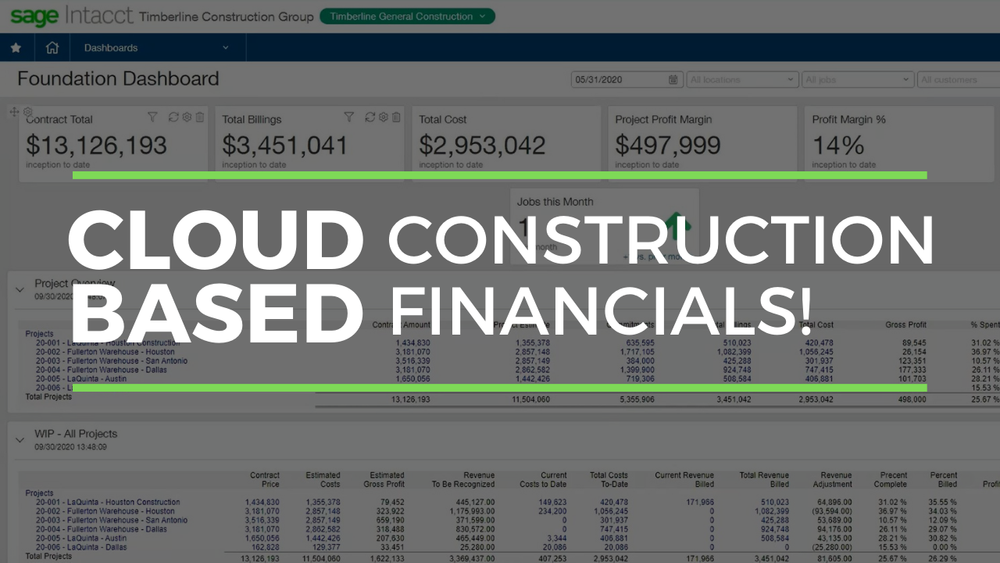
Sage Intacct Construction Brings Financial Management to the Cloud

Sage Intacct Construction

This article is part of Construction Junkie’s coverage of Groundbreak 2020, Procore’s annual technology conference. Sage will be in attendance in the virtual exhibitor hall. More details can be found below.

There’s no doubt that one of the most important aspects of managing a construction project is being able to quickly and easily analyze your financials.  There are a ton of moving parts on each project, from the estimate, to ordering materials and equipment, to billing, and having that information where and when you need it can make all the difference.

The rise of emerging technologies and the realization that project financials need to be readily available from anywhere drove Sage, a popular provider of construction financial management solutions, to develop a cloud-based financial system for the industry, Sage Intacct Construction.

Sage Intacct Construction

Officially announced in March of 2020, Sage Intacct Construction gets its name from a combination of “internet” and “accounting,” as that’s precisely what it is. Your company’s construction financials no longer need to reside on servers, making it easier to use outside of the office and creating a much better environment for integrations with other software.

As the name also suggests, Sage Intacct Construction was designed with the construction industry specifically in mind, and includes functionality and reporting tools that are unique to the industry. Reports within the dashboard have many different configurations to meet your needs.  Financials can be sorted, viewed, and filtered by project type, cost code, project manager, labor & material, and self-performed work vs. subcontracted work, among many other options.

The Evolving Role of the Construction Financial Manager

The system’s open API allows data to flow into the system from outside software, saving you from data redundancies and double data entry.  Financial data in construction can come from a variety of different avenues, like field productivity and payroll apps, CRM solutions, Artificial Intelligence, robotics, and even drones, so having that open API allows Sage Intacct Construction to collect all of the data in the background for real-time analysis.

The ability to integrate with these emerging technologies puts your financial manager in a much better position to forecast, rather than only making decisions based on the past. These systems can also create alerts and organize data in such a way that financial managers can spend more time actually analyzing the data, as opposed to collecting and organizing it.

Interview with Dennis Stejskal, Director of Sage Construction and Real Estate

I held an interview with Dennis Stejskal, the Director of Sage Construction and Real Estate, which you can watch below.  We discussed the evolution of construction financial software and the role cloud-based financials can play in a construction project.  The interview also includes a demo of Sage Intacct Construction, so you can see exactly how it works.

Sage + Procore

Sage and Procore have a long-standing partnership regarding cross platform integrations, starting with Sage 300 Construction and Real Estate, the company’s flagship construction and property management software, and Sage 100 Contractor, an accounting solution for small to mid-sized contractors. These current integrations allow a ton of information to flow back and forth between Procore and Sage, such as project information, insurance documents, change orders, contracts, invoices, and many others.

The two companies are also currently building out an integration with Sage Intacct Construction, which is expected to be released towards the beginning of 2021.

Find Sage at Groundbreak 2020

Sage Groundbreak Coupon Code.png

Groundbreak will be held virtually this year on October 27 and 28. For those interested in finding out more about Sage, the sponsor showcase hours for the virtual exhibitor hall will be held:

Tuesday, Oct 27 - 11:10am - 12:30pm

Wednesday, Oct 28 - 11:10am - 12:30pm 

Register for Groundbreak

source https://www.constructionjunkie.com/blog/2020/10/19/sage-intacct-construction-brings-financial-management-to-the-cloud

Thursday, October 15, 2020

Milwaukee Tool Continues to Enhance ONE-KEY Platform for Inventory Management and Tool Customization

ONE-KEY™ Asset ID Tags, courtesy of Milwaukee Tool

ONE-KEY™ Asset ID Tags, courtesy of Milwaukee Tool

This article is part of Construction Junkie’s coverage of Groundbreak 2020, Procore’s annual technology conference. Milwaukee Tool will be in attendance in the virtual exhibitor hall. More details can be found below.

In 2015, Milwaukee Tool, the company famous for their large selection of red power tools, announced the release of ONE-KEY™, a web-based mobile tool management solution. While the systems 3 core pillars (Inventory Management, Tool Tracking, and Smart Tool Technology) remain unchanged today, the company has continued to develop and enhance the capabilities of the system in many different ways.

Inventory Management

There are very few contractors that work on only one project at a time and managing the quantities, locations, and history of their tools and equipment can be a huge challenge. One of the key features of ONE-KEY™ is its free, online, inventory management system, which helps companies organize their entire fleet of tools onto one platform.

In addition to the inventory dashboard, users can view details of each tool, including serial numbers and purchase information, which can be extremely helpful for insurance claims and warranty repairs. ONE-KEY™ can also help you manage service reminders, through repeating alerts based upon the frequency you request, and track the history of repairs.

All of this information can be managed through the web-based application, or on-the-go through the ONE-KEY™ application from your tablet or smartphone.

Tool Tracking

When Milwaukee® first rolled out Tool Tracking, users could view the last known location of their ONE-KEY™ enabled tools or when another ONE-KEY™ user came within Bluetooth range of one of your tools. While the system still has that same functionality, there are even more ways to track tools today.

Expanded Community Bluetooth Tracking

As Bluetooth range is typically within 100 feet, it was evident at the beginning that the more people that used ONE-KEY™, the more powerful the system could become at helping others find their missing or stolen tools. A few years ago, there were about 30,000 location updates each day within the application and now there are roughly 5.5 million updates every single day.

TICK™ Tracking Devices

48-21-2000_9.jpg

For the tools and equipment, you own that aren’t ONE-KEY™ enabled, like ladders, generators, compressors, etc., Milwaukee also has an external tracking device available, called TICK. Stick it onto your tools in a discreet location using fasteners, glue, or ties and enjoy many of the same tracking benefits as ONE-KEY™ enabled tools.

Geofencing

A couple of years ago, Milwaukee expanded the tracking abilities of their ONE-KEY™ enabled tools and tracking devices with the introduction of geofencing. By setting up a virtual boundary around a tool storage area or jobsite, users will receive alerts if a tool leaves the confines of those boundaries.

Asset ID Tags

For a more economical option for smaller tools or equipment that doesn’t require location tracking, like shovels, hand tools, batteries, etc., Milwaukee has recently released Asset ID tags. Each Asset ID tag is equipped with a barcode for easy scanning and is resistant to water and chemicals, has fade protection from UV light, scratch resistance, and the adhesive is durable through significant fluctuations in temperature.

courtesy of Milwaukee Tool

courtesy of Milwaukee Tool

Smart Tool Technology

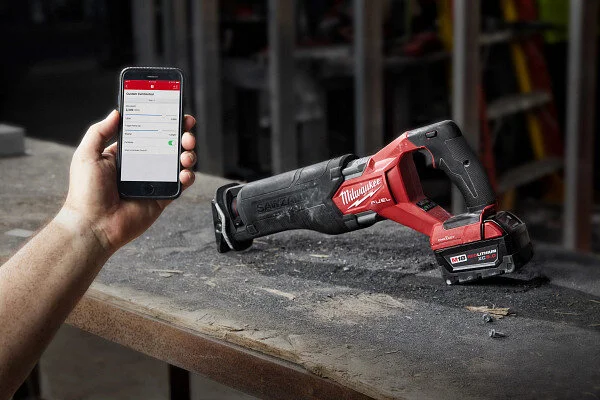
In addition to tool tracking, Milwaukee’s extensive lineup of ONE-KEY™ enabled smart tools offer a ton of additional benefits. Through the app, each tool can be customized for a variety of different settings, such as RPM, LED light settings, anti-kickback and bind up controls, and even torque settings. For even more protection, users can lock their tools out, basically turning them into a paperweight until unlocked by the app or through a Milwaukee Service Center. If a service center receives a locked tool, Milwaukee will track down the original owner and return it to them, if it’s not the person who brought the tool in.

With experienced tradespeople being harder and harder to find, the customization features of ONE-KEY™ can put new employees in a better spot to succeed, by limiting torque settings as to not over fasten into metal or reduce chipping when drilling into fragile materials with reduced RPMs.

Milwaukee’s inventory of ONE-KEY™ enabled tools has expanded to 50 different options currently, including all of the light equipment in their new MX FUEL™ lineup and the new M18 Fuel Sawzall (model #2822-22), which will be available in November.

The new M18 Fuel Sawzall with ONE-KEY™ (model #2822-22). Courtesy of Milwaukee Tool

The new M18 Fuel Sawzall with ONE-KEY™ (model #2822-22). Courtesy of Milwaukee Tool

Milwaukee Tool + Procore

In January, Milwaukee Tool announced an integration with the construction management platform, Procore. In the integration, Procore users can send portfolio and directory data to ONE-KEY™ for automated creation of places and people.  Reporting and alerts data from ONE-KEY™ can then be sent back to Procore’s Daily Log for automated daily reporting. 

Interview with Andy Lambert, Group Program Manager of ONE-KEY™, and Kris Lengieza, Director of Business Development for Procore

To discuss the evolution of ONE-KEY™ further, I recently had the opportunity to speak with Andy Lambert from Milwaukee Tool and Kris Lengieza from Procore, which you can watch in the video below. We discussed the benefits of the ONE-KEY™ system and Procore’s new partnership with the tool brand.

Find Milwaukee Tool at Groundbreak 2020

Milwaukee GBK Coupon Code.png

Groundbreak will be held virtually this year on October 27 and 28. For those interested in finding out more about Buildr, the sponsor showcase hours for the virtual exhibitor hall will be held:

Tuesday, Oct 27 - 11:10am - 12:30pm

Wednesday, Oct 28 - 11:10am - 12:30pm 


source https://www.constructionjunkie.com/blog/2020/10/14/milwaukee-tool-continues-to-enhance-one-key-platform-for-inventory-management-and-tool-customization

Tuesday, October 13, 2020

Bridgit Bench Helps You Optimize Construction Workforce Management in the Cloud

bridgit-bench-construction-resource-management-construction-junkie.png

There has been a lot of talk about the labor shortage facing the construction industry in the past few years, which makes it even more important for your company to properly manage the team members it currently has. Typically, workforce resource management is completed in spreadsheets -- if completed at all – many times leading to overworked or underworked staff.

Bridgit, a construction technology company, released a product called Bridgit Bench to simplify the tracking of labor resources and simplify project planning processes.

Bridgit Bench

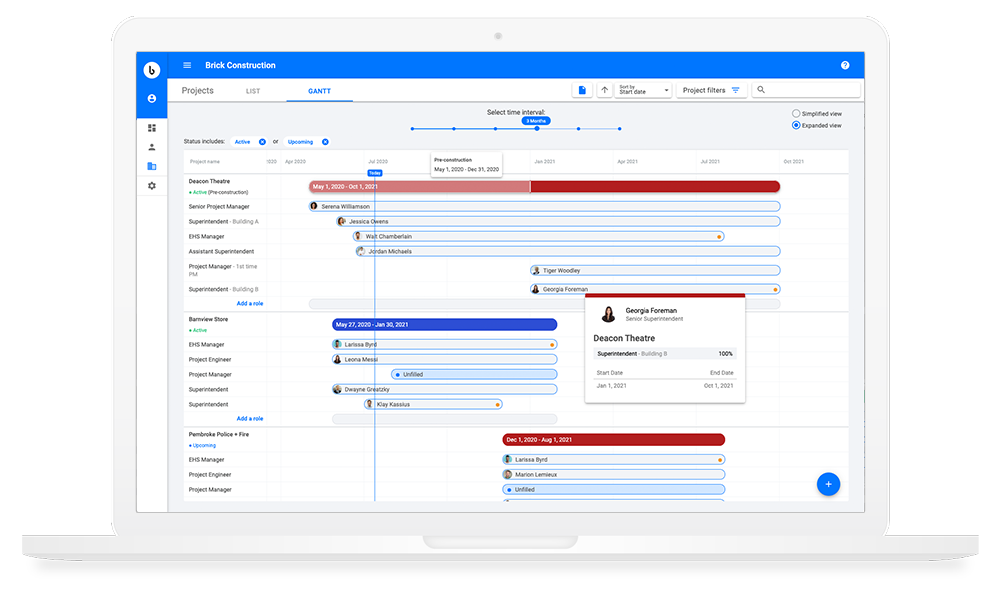
Launched in 2019, Bridgit Bench is a web and mobile based workforce planning application that allows users to easily see the projects that are overstaffed or understaffed, as well as the workers who are over or underworked. Appearing in a familiar Gantt chart-style format, the software allows you to make quick adjustments to overall timeline and allocated labor force to optimize your staff to your project’s needs.

Bridgit Bench also makes it easy to forecast future labor needs with a 12 month look ahead option on your projects.  That gives your HR team time to hire more people, if needed, or your sales team to find more projects to infill when workers are on the “bench” without enough work.

courtesy of Bridgit

courtesy of Bridgit

The skills, job role, experience, certifications, and even relocation preferences of individual employees are stored within the program, as well, so you can assign the best people to the right jobs. When building your project teams, employees can also be filtered based upon all of that criteria for easier access.

Projects can be filtered and sorted in much of the same way as the employees. Users can quickly find the projects they’re looking for based on the type, stage, geographic region, and by jobs with unfilled job roles.

Interview with Sean Erjavec, Chief Revenue Officer of Bridgit

I recently had the pleasure of interviewing Sean Erjavec of Bridgit about how Bridgit got its start and how Bridgit Bench is helping with workforce management, which you can watch below. The video also includes a helpful demo of Bridgit Bench, so you can see exactly how it works!

Adapting to the Pandemic

The Coronavirus Pandemic has certainly caused a lot of changes in the construction industry, and technology adoption has been an interesting result. I’ve heard from many construction technology companies that not only have they seen a large influx of new users, but a large increase in usage for their existing customers – Bridgit being no exception.

“Over the last three months, Bridgit has experienced a 72 percent increase in usage across our customer base, both in the US and Canada,” said Mallorie Brodie, CEO and co-founder at Bridgit, in a press release announcing $7 million USD in strategic investment led by Autodesk. “With construction recently restricted and projects delayed, contractors have needed to shift their processes and are demanding the workforce data and insights that Bridgit provides. The new funding will allow us to empower contractors to use their resources effectively, build more efficiently, and with Autodesk, have a more complete picture of people and projects across their organization.”

Bridgit has also added a “COVID Impacted” section to employee profiles, so you know they will be unavailable due to quarantining or other pandemic related issues.

Bridgit Bench + Procore

Bridgit Bench customers that also use Procore enjoy additional benefits from their pre-built integrations.  Double data entry is greatly reduced as project information flows across both platforms, including overall project timelines.  Bridgit Bench is also part of Procore’s embedded app experience, allowing users to access the full version of Bridgit Bench without leaving Procore.

Find Bridgit at Groundbreak 2020

Bridgit Grounbreak Coupon Code.png

Groundbreak will be held virtually this year on October 27 and 28. For those interested in finding out more about Bridgit, the sponsor showcase hours for the virtual exhibitor hall will be held:

Tuesday, Oct 27 - 11:10am - 12:30pm

Wednesday, Oct 28 - 11:10am - 12:30pm 

register for groundbreak

source https://www.constructionjunkie.com/blog/2020/10/13/bridgit-bench-helps-you-optimize-construction-workforce-management-in-the-cloud

Thursday, October 8, 2020

Buildr Makes Project Closeout Quick and Painless

courtesy of Buildr

courtesy of Buildr

This article is part of Construction Junkie’s coverage of Groundbreak 2020, Procore’s annual technology conference. Buildr will be in attendance in the virtual exhibitor hall. More details can be found below.

It’s no secret that closeout is one of the worst parts of any construction project.  As the job is nearing its end, there are still a ton of forms, as-builts, warranty documents, O&M manuals, and other paperwork that need to be collected and put into binders to hand over to the project owner – a process that can take hundreds of man-hours, in some cases. Nevertheless, closeout is a vital component to successfully turning over a project and ending on a good note.

So while the traditional closeout process can be pretty painful, the good news is that a company called Buildr is making that process much quicker, while also providing the contractor a great value add to offer to their customers.

Buildr

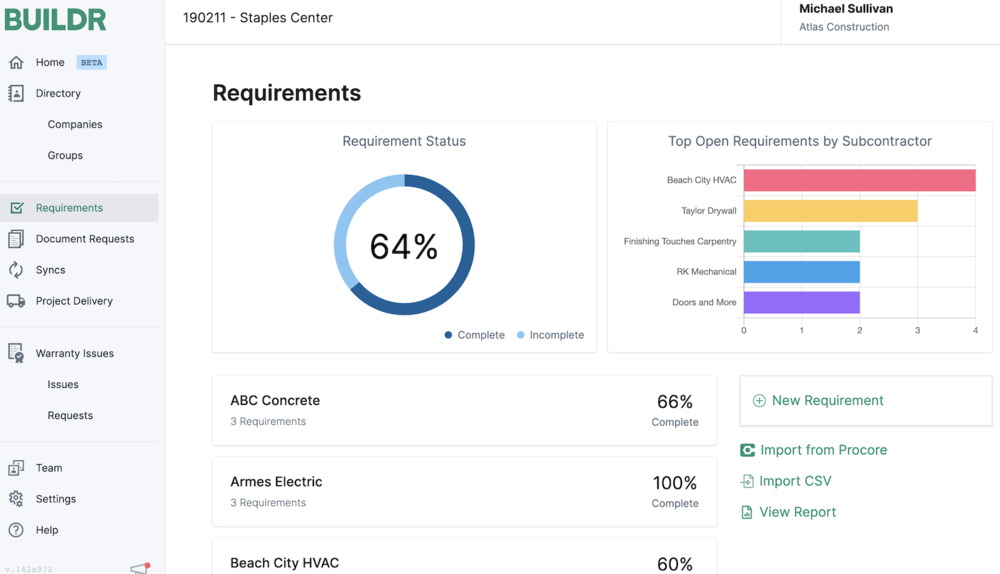
First and foremost, Buildr is a post-construction platform that focuses on the project closeout process.  Through a simple, online platform, users can upload all of their required closeout documentation and Buildr then transforms it into an easily navigable, highly interactive, PDF document that contractors can deliver to the owner.

The documents are automatically added to a table of contents with clickable links, making it extremely intuitive to find any document after the project is complete. Buildr also has a built-in system to remind subcontractors who have not submitted required documentation, relieving the general contractor of the hassle of continually following up.

courtesy of Buildr

courtesy of Buildr

Value Add for the Owner

Not only does Buildr make the closeout process much less painful for the contractor, it also creates a huge additional value to the project owner. With the PDF document, all of the most important information that the owner or facility manager will need is kept in the same place and is always immediately accessible. As a contractor, that’s a great way to set yourself apart from your competitors.

Owners and facility managers also have the ability to create warranty calls directly in the Buildr platform. The warranty call will be sent to the GC’s warranty claims representative and is logged in the warranty requests tab for status updates and historical data.

Buildr + Procore

Two of Buildr’s co-founders were early employees of Procore, helping build the construction management platform up to where it is today.  With their intimate knowledge of the software, they were able to create an extremely helpful integration between both platforms that allows the pertinent closeout documents from each project’s Procore page to flow into Buildr with the click of a button – a “magic” green button, to be exact. Once that button is pressed, Buildr goes to work creating the PDF closeout document with no additional work necessary from the user.

Buildr is also part of Procore’s embedded app experience, which means that users can log into Buildr with their Procore credentials and use the full version of Buildr without ever leaving Procore.

Interview with Caleb Taylor, Co-Founder of Buildr

I was recently able to interview one of the Co-Founders of Buildr, Caleb Taylor, which you can watch below.  The video contains an extremely helpful demo of the software, allowing you to see exactly what the closeout process within Buildr looks like.

Find Buildr at Groundbreak 2020

Groundbreak 2020 COupon Code.png

Groundbreak will be held virtually this year on October 27 and 28. For those interested in finding out more about Buildr, the sponsor showcase hours for the virtual exhibitor hall will be held:

Tuesday, Oct 27 - 11:10am - 12:30pm

Wednesday, Oct 28 - 11:10am - 12:30pm 

register for groundbreak

source https://www.constructionjunkie.com/blog/2020/10/8/buildr-makes-project-closeout-quick-and-painless

Tuesday, October 6, 2020

3 Construction Workers Killed, 1 Injured After Partial Building Collapse in Houston

Via Twitter // Houston Fire Department

Via Twitter // Houston Fire Department

In what seems to be an all-too-common occurrence recently, a partial building collapse yesterday has sadly cost the lives of 3 construction workers and injured one additional worker.

Yesterday afternoon, the Houston Fire Department responded to an emergency call involving a partially collapsed building on the West side of the city. The New York Times reported that the collapse happened during the installation of a precast concrete interior staircase that all the way from the 13th or 14th floor of the building down to the first floor.

Houston FD noted the injured worker was in stable condition following the incident. Akin to the recent building collapse in New Orleans, the assistant Houston Fire Chief Ruy Lozano told reporters that the building is currently too unstable for first responders to safely enter the building. As of Monday evening, the bodies of the 3 victims have not yet been recovered, nor have their names been released.

A total of 240 workers were on-site when the incident occurred and all have been accounted for. The building under construction plans to become the future headquarters for Marathon Oil.

Local Houston news channel KPRC has more details in the video below:


source https://www.constructionjunkie.com/blog/2020/10/6/3-construction-workers-killed-1-injured-after-partial-building-collapse-in-houston

Thursday, October 1, 2020

GoFormz Reduces Communication Silos Through Mobile Forms

courtesy of GoFormz

courtesy of GoFormz

This article is part of Construction Junkie’s coverage of Groundbreak 2020, Procore’s annual technology conference. GoFormz will be in attendance in the virtual exhibitor hall. More details can be found below.

One thing that many people don’t realize about the construction industry is the large amount of forms we have to fill out, such as inspections, daily logs, checklists, and meeting minutes. Traditionally, all of these forms would be filled out on paper, stored in a binder, scanned into a computer, and eventually sent to the office staff for further filing. These manual resources waste significant time and spend. Thankfully, that doesn’t have to be the case anymore, as companies like GoFormz are making the process digital.

GoFormz

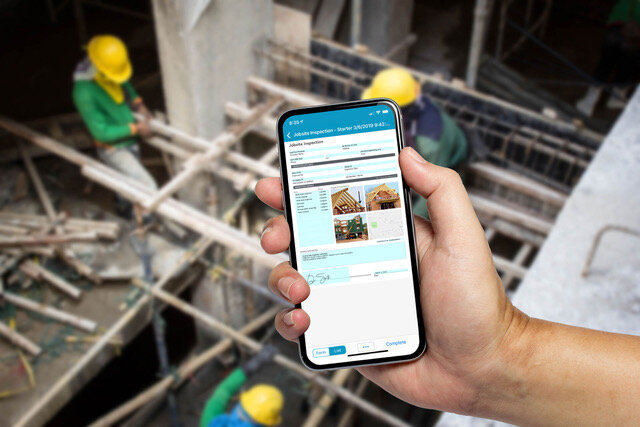
GoFormz  users can create digital forms that work online and on mobile devices, like phones and tablets, in an app-like experience. These forms can look exactly like their company’s existing forms or brand new forms built from scratch. There’s no need to know how to code, as the platform provides an online, dynamic drag-and-drop form builder that anyone can use. To get started filling out your mobile forms on your devices simply download the GoFormz mobile app.

There are a variety of field options available to add to your forms, including the standards like text, drop down boxes, numbers, and dates, but they also have some advanced options that could be extremely helpful on the jobsite.  Advanced fields include the ability to add images, signatures, sketches, maps and GPS, and even barcode scanning.

Dynamic Form Fields

These aren’t just static, manual input-only forms either, as users can add logic to certain fields to perform instant calculations, make fields change color based upon the data input, or make inputs become required based on previous answers. That kind of control encourages consistency across your organization and makes data analysis much easier for the office staff.

Data Capture, Anywhere

With your forms digitized, your teams in the field can easily capture job site data using mobile devices like phones and tablets. Embedded logic and features, like auto-populated fields, accelerate form completion and improve the accuracy of input data. Once a form has been submitted, it is instantly available for review and processing, eliminating the need for manual form delivery – saving your team significant time and budget.

If your jobsite is in a remote location without a cell signal, mobile forms can be completed offline and uploaded once a signal is regained.

courtesy of GoFormz

courtesy of GoFormz

Automated Workflows

One of the biggest challenges with using paper forms is distribution. Oftentimes, we fill forms out, store them in our personal folders, and they never see the light of day unless a problem arises later.  With GoFormz, the workflow of these digital forms can be automated to distribute to certain contacts, dispatched to teams in the field, emailed to customers, and uploaded to a project management system, like Procore. Having all of this information instantly available greatly increases your chances of solving issues before they become emergencies.

GoFormz + Procore

GoFormz users who also utilize Procore can see additional benefits through the integration available within the Procore App Marketplace. With a project already set up within Procore, information from project templates, user directory, and permissions can be automatically applied to your templates within GoFormz to reduce double data entry. Data captured within GoFormz can also be used to update or create corresponding Procore records and instantly upload completed forms to the Procore Documents tool, and more.

Several other workflows can be automated through the integration, as well, including time & materials tracking, budget modification approvals, toolbox talk forms, and incorporating manpower and equipment data from Procore to daily logs within GoFormz.

To test drive the GoFormz platform, sign up here for a free trial or request a demo

Find GoFormz at Groundbreak 2020

GoFormz Coupon Code.png

Groundbreak will be held virtually this year on October 27 and 28. For those interested in finding out more about GoFormz, the sponsor showcase hours for the virtual exhibitor hall will be held:

Tuesday, Oct 27 - 11:10am - 12:30pm

Wednesday, Oct 28 - 11:10am - 12:30pm

Register for Groundbreak


source https://www.constructionjunkie.com/blog/2020/9/28/goformz-reduces-communication-silos-through-mobile-forms